What is a webhook?
Webhooks provide event based triggers that notify your system the moment something happens in iDonate. When a selected event occurs, iDonate sends an HTTP request to the endpoint you configure, delivering the event details right away.
This gives your system immediate updates without needing to poll for changes. Webhooks operate at the organization level and can be triggered by events related to Donations, Donors, Events, Peer to Peer, and Recurring Donations.
Event Triggers
|
Technical Name |
Display Name |
Description |
|
donor.contact_updated |
Contact Updated |
A Donor attribute is updated |
|
donor.cancel_organization_schedules |
Donor Cancelled Schedules |
A Donor cancels all active recurring schedules via SMS by texting "delete" |
|
event_registration.registered |
Attendee Registered |
Someone registered for a ticketed event |
|
p2p_fundraiser.created |
Fundraiser Created |
A P2P Fundraiser was created |
|
p2p_fundraiser.milestone_reached |
Milestone Reached |
A P2P Fundraiser milestone was reached |
|
p2p_fundraiser.posted |
Fundraiser Profile Update |
A P2P Fundraiser posted an update |
|
p2p_fundraiser.updated |
Fundraiser Updated |
A P2P Fundraiser was updated |
|
p2p_program.archived |
Program Archived |
A P2P Program was archived |
|
p2p_program.created |
Program Created |
A P2P Program was created |
|
p2p_program.updated |
Program Updated |
A P2P Program was updated |
|
recurring_donation_schedule.cancelled |
Schedule Cancelled |
A Donor has cancelled a recurring gift schedule |
|
recurring_donation_schedule.created |
Schedule Created |
A Donor has created a recurring gift schedule |
|
recurring_donation_schedule.donor_update_requested |
Donor Update Requested |
A Donor has requested a recurring schedule update |
|
recurring_donation_schedule.updated |
Schedule Updated |
A Donor has updated a recurring gift schedule |
|
transaction_set.created |
Donation Created |
A donor made successful donation |
|
transaction.updated |
Donation Updated |
A donation is changed in any way |
Create and Edit Webhook
To access the Integrations page, users must have Admin level permissions.
- In iDonate, navigate to Settings, then click on Integrations.
- Select iDonate Webhooks and then click Configure.
- Note, if you already have a webhook set up, click Add Instance instead.
- A pop-up will open where you will be prompted to enter:
- Name (required)
- Subscribed Notifications: Select the events you want to be notified about. All events are enabled by default, so deselect any you don't need. At least one must remain selected for notifications to be delivered.
- Target URL (required): Specifies where you would like notifications sent.
- This URL should be reachable via HTTPS.
-
Click Finish to complete the setup of your webhook.
-
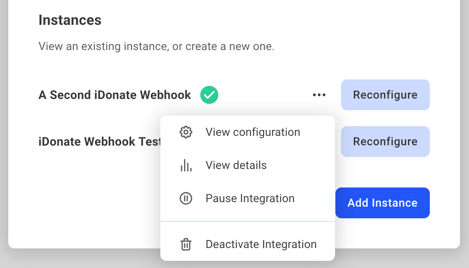
To edit a webhook, click the iDonate Webhooks card and select Reconfigure on the webhook you want to update.
- To disable or delete a webhook, again click the iDonate Webhooks card and then click the ellipsis menu (...) next to Reconfigure.
- Pause Integration: Prevents the webhook from sending notifications while keeping its settings intact.
- Deactivate Integration: Deletes the webhook entirely and removes all associated configuration settings.