How is your donation experience stacking up to benchmarks?
Every spring and summer, the nonprofit benchmarks pour in. I can barely keep up with all of the new reports and case studies in my inbox. I bet you...
Features
Product Spotlight

Mobile-First Pop-Up Donation Form
Launch mobile-first pop-up forms in minutes, use built-in tools to capture more donations, and optimize the giving experience—no dev team required.
By team
The essentials
New to online donation pages for your nonprofit? Start here.
Donation page A/B testing - no science degree needed.
Keep your donation page loading fast - and drive higher conversions.
Digital fundraising resources

The 4 Types of Online Donation Experiences
89% of donors leave without giving. Learn how to use the right donation form to close the gap and boost conversions.
10 min read
Marifran Ritchie
:
July 9, 2026
Your donation page is often the final step between a supporter's good intentions and an actual gift. Yet for many nonprofit and university fundraising teams, updating that page feels like submitting a help desk ticket and waiting days (or weeks) for a developer to make a simple change. By the time the update goes live, your campaign window may have already closed.
The good news? Modern donation page builders have evolved to put control directly in your hands. With tools like iDonate's smart form builder, your team can customize branded giving experiences, run A/B tests, and optimize for conversions, all without writing a single line of code or waiting on IT.
This guide walks you through everything you need to know about donation page customization and testing, from foundational best practices to advanced optimization strategies that drive measurable results for your mission.
Donation page customization refers to the ability to modify the design, layout, messaging, and functionality of your online giving forms without requiring technical expertise. This includes everything from changing colors and images to adjusting gift arrays, adding value propositions, and embedding forms directly on your website.
Why does this matter for your nonprofit? According to recent M+R Benchmarks data, the average main donation page conversion rate sits around 11% for desktop users and 8% for mobile users. That means roughly 9 out of 10 visitors leave without completing a gift.
Every element on your donation page — from the headline to the button color to the number of form fields—influences whether a donor completes their gift or abandons the process. When you can make changes quickly and test what works, you capture more of that existing traffic.
Many nonprofit organizations rely on web developers or IT departments to make even minor updates to donation pages. This creates bottlenecks, especially during high-volume giving periods like Giving Tuesday or year-end campaigns when speed matters most.
A survey of nonprofit fundraising professionals found that the average turnaround time for donation page updates through IT channels ranges from three days to two weeks. For time-sensitive campaigns, that delay can cost thousands in potential donations.
When donation pages exist separately from your CRM and analytics tools, you lose visibility into donor behavior. You might know how many gifts came in, but not which version of your page performed better or where donors dropped off in the process.
This fragmentation makes it nearly impossible to make data-driven decisions about page optimization. You end up relying on intuition rather than evidence and intuition; as research consistently shows, is no better than a coin flip when predicting donor behavior.
Generic donation forms that look disconnected from your organization's brand can erode donor trust. When supporters click a donate button and land on a page that looks nothing like your website, they may hesitate to enter payment information.
Brand consistency builds confidence. Donors want to see your logo, colors, and messaging reflected throughout the entire giving experience—from initial appeal to confirmation page.
No-code donation page builders put customization power directly in the hands of fundraising and marketing teams. Rather than submitting change requests and waiting for developers, you can drag and drop elements, preview changes in real-time, and publish updates within minutes.
With a visual editor, you select elements from a menu and place them where you want on your page. Want to add a compelling image above your gift array? Drag it into position. Need to test a new headline? Type it in and see how it looks instantly.
iDonate's donation page builder offers pre-optimized templates developed in partnership with NextAfter, whose research team has conducted thousands of A/B tests across the nonprofit sector. These templates incorporate proven design patterns that increase conversion rates out of the box.
Before publishing any changes, you can preview exactly how your page will appear on desktop, tablet, and mobile devices. Since more than half of nonprofit website traffic now comes from mobile devices, ensuring your donation page looks great and functions smoothly on smaller screens is essential.
iDonate automatically optimizes your pages for mobile viewing, adjusting layouts and button sizes to make the giving experience easy regardless of device.
When your donation page connects directly to your donor database, every gift automatically flows into your CRM with complete attribution data. You see which campaigns, channels, and page variations drove each donation.
This integration eliminates manual data entry and reconciliation work, freeing your team to focus on strategy rather than spreadsheets.
Your value proposition tells donors why they should give and how their contribution makes a difference. Research from NextAfter shows that including a clear value proposition as the first section of your donation page can increase conversions by as much as 150%.
Effective value propositions answer these questions for donors:
Your gift array—the preset donation amounts displayed on your page—significantly influences giving behavior. Donors often anchor to the options you present, so the amounts you choose matter.
Consider testing different configurations:
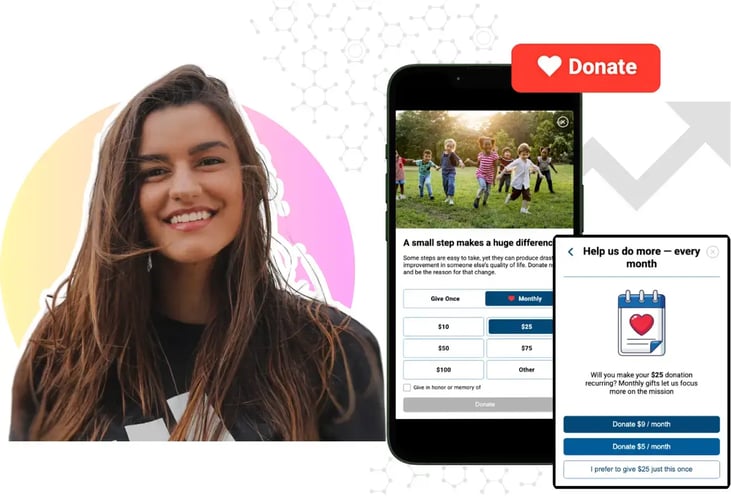
Monthly donors contribute more over time and retain at significantly higher rates than one-time givers. Research indicates recurring donors give an average of $288 annually compared to $155 for one-time gifts.
Test these recurring giving elements:
iDonate's Recurring Gift Prompt feature automatically invites one-time donors to convert to monthly giving, helping you build predictable revenue streams.
Every additional form field creates potential drop-off points. Only ask for information you absolutely need to process the donation. If you currently require phone numbers, mailing addresses, or custom questions, consider whether those fields are truly necessary—or if they could be collected after the gift is complete.
Offering multiple payment options increases accessibility and reduces abandoned gifts. Beyond credit and debit cards, consider enabling:
Customize colors, fonts, images, and layouts to match your organization's visual identity. Consistent branding builds trust and reassures donors that they are giving to a legitimate organization.
Add compelling photos or videos that show your mission in action. A single powerful image can communicate impact faster than paragraphs of text.
A/B testing (also called split testing) compares two versions of your donation page to see which performs better. Half of your visitors see Version A (the control), while the other half sees Version B (the challenger). After collecting enough data, you determine which version generated more conversions or revenue.
Human intuition frequently fails when predicting donor behavior. In one documented experiment, removing a video from a donation page—something most fundraisers would assume would hurt performance—actually increased donations by 560%. Another test found that a simple change in email messaging tone increased giving by 360%.
Without testing, you would never discover these insights. You might invest time and money promoting a page design that actively discourages donations.
Individual test wins may seem small—a 5% improvement here, a 10% lift there. But these gains compound over time. If you improved your conversion rate by just 1% each month through consistent testing, the cumulative impact over a year would substantially increase your fundraising revenue.
Organizations that make testing a regular practice see sustained growth that organizations relying on intuition simply cannot match.
Before designing any test, define exactly what you want to measure. Common goals include:
Choose one primary metric to evaluate success. Trying to optimize for multiple goals simultaneously makes results harder to interpret.
Confirm that your analytics tracking captures the data you need. At minimum, track traffic to your donation page, form submissions or completed gifts, and revenue amounts.
iDonate includes native analytics that automatically tracks these metrics, eliminating the need for complex Google Analytics configurations or third-party tools.
A hypothesis transforms a vague idea into a testable statement. Use this template:
Because we observed [data or feedback], we expect that [change] will cause [impact]. We will measure this using [metric].
Example: "Because we observed low conversion rates, we expect that adding a clear value proposition above the gift array will cause more visitors to complete donations. We will measure this using total donations."
Running a test too briefly produces unreliable results. Use a sample size calculator to determine how many visitors need to see each version before you can draw valid conclusions.
Key inputs include your current conversion rate, the minimum improvement you want to detect, and your desired confidence level (typically 95%).
Create the alternative version of your page based on your hypothesis. Change only the elements your hypothesis addresses; if you modify too many things at once, you will not know which change drove the results.
With iDonate's A/B testing module, you can duplicate your existing page, make your changes using the drag-and-drop editor, and set up the test within minutes.
Once your test goes live, resist the urge to check results constantly or end the test early. Let the data accumulate until you reach statistical significance.
General guidelines:
When your test reaches significance, evaluate the results against your hypothesis. Did the challenger outperform the control? By how much?
Document everything—hypothesis, variations, results, and insights. This record becomes invaluable for informing future tests and sharing learnings with colleagues.
If your challenger won, promote it as your new control. Then immediately begin planning your next experiment. Successful testing programs maintain a continuous pipeline of ideas to evaluate.
iDonate stores all your test history in one place, making it easy to track cumulative improvements and build on past learnings.
Test different ways of framing your ask. Does an emotional appeal outperform a statistics-based message? Does mentioning a specific program increase conversions compared to general fund language?
Experiment with the number, values, and descriptions of suggested gift amounts. Test whether impact statements ("$50 provides meals for a family for one week") increase average gift size.
Try reducing form fields to the absolute minimum. If you currently collect optional information like phone numbers or employer names, test removing those fields entirely.
Compare different hero images, test whether video helps or hurts conversions, and evaluate whether adding photos of beneficiaries increases giving.
Small changes to your donate button can produce surprising results. Test different calls to action ("Give Now" versus "Donate Today" versus "Make a Difference") and button colors that create strong visual contrast.
If donors abandon your form at the payment step, test adding security badges, encryption language, or padlock icons near credit card fields.
Impatience leads to false conclusions. A test that shows promising results after two days may reverse completely by day seven. Let tests run until you reach the calculated sample size and statistical significance.
When you change multiple elements simultaneously, you cannot isolate which change caused the outcome. Change one thing at a time, or group changes under a single testable hypothesis.
With more than half of nonprofit web traffic coming from mobile devices, testing only on desktop misses critical insights. Ensure your variations work well across all screen sizes.
Tests lose value when learnings stay siloed. Create a shared repository of test results so your entire team can apply insights across campaigns and channels.
iDonate was built specifically for nonprofits who want to optimize their digital fundraising without technical complexity. The platform combines powerful customization tools with built-in A/B testing capabilities designed for fundraising teams—not developers.
Create beautiful, branded donation pages using visual tools that require no coding knowledge. Choose from pre-optimized templates or start from scratch, customizing every element to match your organization's identity.
Set up split tests directly within the platform. Duplicate pages, create variations, define traffic splits, and track results, all from a single dashboard. One-click promotion makes it easy to implement winning variations.
Monitor conversion rates, donation totals, average gift sizes, and other key metrics without leaving the platform. Track test performance over time and export data for deeper analysis.
iDonate's templates incorporate findings from thousands of A/B tests. Start with designs proven to convert, then customize and test further improvements specific to your audience.
Every donation page built with iDonate automatically adapts to mobile devices. Fast load times and touch-friendly interfaces ensure donors complete gifts regardless of how they reach your page.
iDonate maintains SOC 2 Type 2, PCI Level 1, and GDPR compliance, so you can assure donors that their payment information stays protected. Regular penetration testing by third-party security firms verifies ongoing protection.
The most successful nonprofit digital fundraising programs treat testing as an ongoing practice rather than a one-time project. Here's how to build that mindset into your team:
You do not need a sophisticated testing program from day one. Run a single test, learn from the results, and share the outcome with colleagues. Small wins build momentum and buy-in for expanded testing.
After each test, generate new questions and hypotheses to investigate. When you finish one experiment, you should have another ready to launch. This continuous pipeline ensures testing never stalls.
Insights from donation page tests can inform email marketing, social media appeals, direct mail design, and more. Create regular touchpoints to share learnings across departments.
When presenting results to leadership, translate percentage improvements into dollar amounts. A 10% increase in conversion rate means something different to executives when expressed as $50,000 in additional annual revenue.
Yes. Platforms like iDonate offer simple donation form builders that require no coding knowledge. You can change layouts, add images, modify text, and adjust gift arrays using visual tools that show changes in real time.
Run tests until you reach statistical significance, typically at least one week to account for daily traffic variations. Use a sample size calculator to determine required visitors based on your current conversion rate and desired confidence level.
Value propositions, gift array configurations, form length, and mobile responsiveness consistently produce significant results. iDonate's pre-optimized templates address these high-impact elements from the start.
iDonate includes a native A/B testing module that lets you create variations, split traffic, track results, and promote winners—all within the platform. No third-party tools or developer support required.
Fewer fields generally mean higher conversion rates. Collect only information essential to processing the donation. iDonate helps you minimize fields while maintaining the data you need for donor stewardship.
Use a platform with automatic mobile responsiveness like iDonate. Preview your pages on multiple device sizes before publishing, and test performance on actual phones and tablets.
Secure donation pages require PCI compliance, data encryption, and fraud detection. iDonate maintains PCI Level 1 certification and SOC 2 Type 2 compliance, giving donors confidence their payment information stays protected.
Every spring and summer, the nonprofit benchmarks pour in. I can barely keep up with all of the new reports and case studies in my inbox. I bet you...
Optimizing your donation pages is equally important as optimizing the marketing and communications activities that lead people there. Your...
When it comes to donation forms, small tweaks can make a big difference. One of the most overlooked—but high-impact—choices a nonprofit can make is...