 iDonate
The Non-Profit Year-End Fundraising Planning Timeline
The Nonprofit Year-End Fundraising Planning Timeline It's that time again! Halloween costumes are on display in all the stores far too soon, but it’s...
Product Spotlight
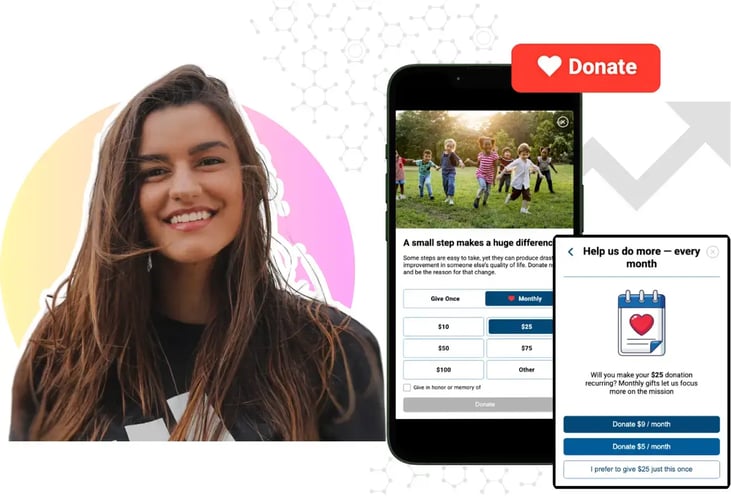
Mobile-First Pop-Up Donation Form
Launch mobile-first pop-up forms in minutes, use built-in tools to capture more donations, and optimize the giving experience—no dev team required.
The 4 Types of Online Donation Experiences
89% of donors leave without giving. Learn how to use the right donation form to close the gap and boost conversions.
When gifts slow down, it's tempting to blame the traffic. But most conversion problems sit on the donation page itself, and you do not need maps or session recordings to spot them. Combine data, observation, and a little measurement, and you can pinpoint where donors hesitate and fix the biggest issues first.
This guide walks through three approaches, starting with the fastest checks and moving to the more involved ones. Work through them in order. We'll show how iDonate does the same job in a fraction of the time.
Start with a simple review! No data is required. Open your donation page and compare it against the issues that most often cost nonprofits gifts.
Common conversion killers:
iDonate takes this checklist off your plate. The Giving Form Builder is mobile-first by default, keeps forms to the fields that actually convert, turns on one-click recurring giving, and includes security and impact messaging out of the box. Instead of auditing for friction, you launch a page built to avoid it.
Statistics tell you what might be wrong. Watching real people tells you what actually is. This is the one thing most teams never do, and it's usually the most valuable. Here at iDonate, that's our specialty.
Walk it yourself first
Complete a real donation on desktop, iPhone, Android, and more than one browser. As you go, note:
Then watch 5 to 10 others
Ask supporters who haven't donated recently to complete a gift while sharing their screen and talking through what they're thinking. Don't help. Only step in if they get truly stuck. A handful of sessions is usually enough to surface the biggest obstacles:
Ask donors and non-donors directly
Quality feedback fills in the gaps that analytics can't. Reach out to recent supporters, and to people who meant to give but didn't:
Ask donors:
Ask non-donors:
iDonate shortens this whole process.
Even without page analytics, your organization already has signals sitting around. Pull them together into a difficult funnel.
Build a basic funnel from what you have
Most organizations can find the data they need using tools they already have. Website analytics can show page visits, while your CRM or payment processor can provide completed donations, average gift size, and campaign performance. Together, these things can help you calculate one of the most useful indicators of fundraising performance:
Basic conversion rate = Completed donations divided by page visits, times 100
A single number tells you whether the problem is traffic quality or the donation experience itself.
Compare your channels
If one channel consistently performs better than another, it can help you identify where improvements are needed. For example, if email campaigns generate donations but social media campaigns do not, you may need to adjust your messaging or target audience. If donation rates are low across every channel, it may be worth reviewing the donation page to see if the giving process is creating unnecessary difficulties.
It's also very important to pay attention to feedback from your staff. They often notice recurring issues before they appear in your reporting. These common warning signs include:
Even if your fundraising platform has limited reporting, you can still measure key data points using your website analytics. Tracking donation page visits, thank-you page visits, completed donations, can help you understand which campaigns are driving results and where donors may be struggling.
For organizations using iDonate, much of this reporting is available in one place. The Giving Management Suite tracks data such as page visits, conversion rates, average gift size, recurring giving, and campaign performance through a single dashboard. Having these insights in one system can make it easier to see actual fundraising performance without relying on multiple tools or manual spreadsheets. At the end of the day, no one wants manual work to complete.
You can reduce the whole process to four questions and the evidence that answers each one.
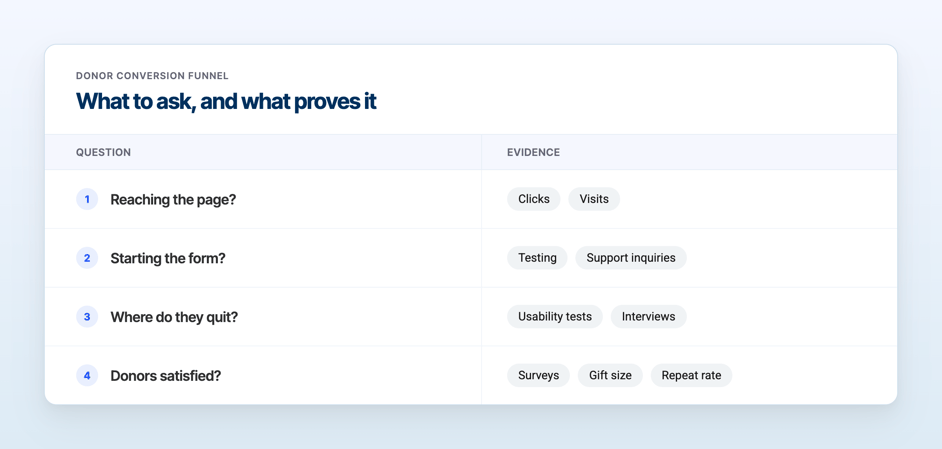
Most nonprofits see actual gains from user testing, simpler forms, clearer messaging, and better mobile design, long before they need to invest in more sophisticated data tools.
Many of the common challenges nonprofits face with online giving can be solved with the right fundraising tools. iDonate provides mobile-friendly giving forms, reporting dashboards, and features designed to help organizations better understand donor behavior and improve the giving experience.
Instead of pulling data from multiple systems, teams can use one platform to monitor results, spot potential issues, and spend less time managing the technical side of fundraising.
Let's make donating easy again!
Book a demo | See Your Donation Form on iDonate
.jpg)
The Nonprofit Year-End Fundraising Planning Timeline It's that time again! Halloween costumes are on display in all the stores far too soon, but it’s...

If you work on a fundraising team at a food bank, you probably know the feeling. Your team is small, your budget is tight, and your donation page has...

 Marifran Ritchie : August 10
How to Diagnose Donation Page Drop-Offs You know your donation page isn't converting the way it should. What you don't know is why.